
Applying happens on a dedicated application page. You can complete it in one sitting, or save and return — here’s the full flow.
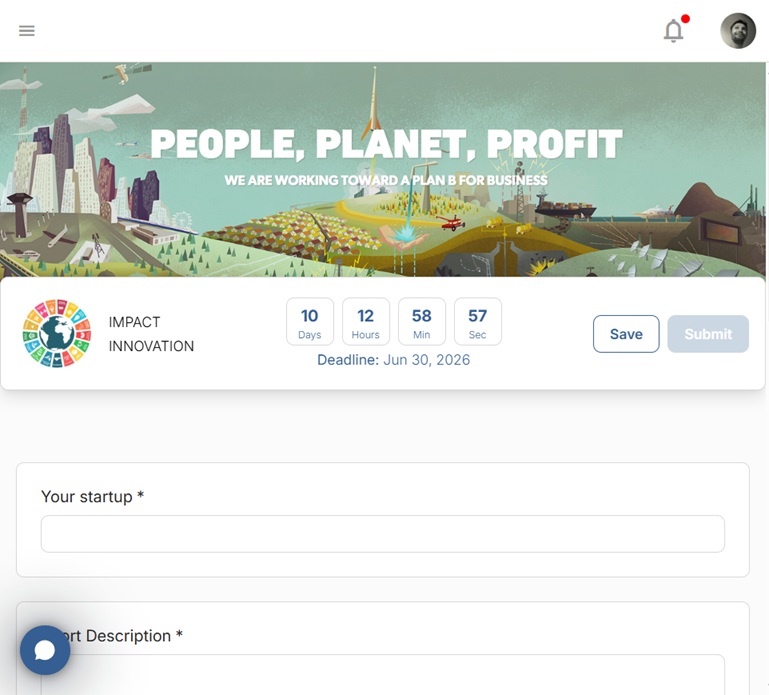
1. Open the application #
Follow the application link your organizer shared, or open Applications in the program space. You’ll first see the program’s landing page, with the key details and what’s expected of applicants.
2. Answer the questions #
Select Apply and work through the form. You’ll meet a range of question types — short and long text, dropdowns, multiple choice, numeric (“amount”) fields, radio buttons, checkboxes and file uploads. Required questions are clearly marked, and some questions appear or disappear depending on your earlier answers, so the form stays relevant to you.
3. Add any supporting files #
Where the form asks, upload the requested documents — a pitch deck, financials, or eligibility paperwork. See Uploading files to your application for tips.
4. Submit #
You don’t have to finish in one go — Save as you work and come back later. When everything’s complete, select Submit. Until then your application stays a Draft; once submitted it’s marked Submitted and reaches the program team for review.
Related: Saving your application and finishing it later · What happens after you submit.


