
Sessions are booked right inside Babele — calendars, invites and meeting links are handled for you. You can start from an application, a venture, or a member’s profile.
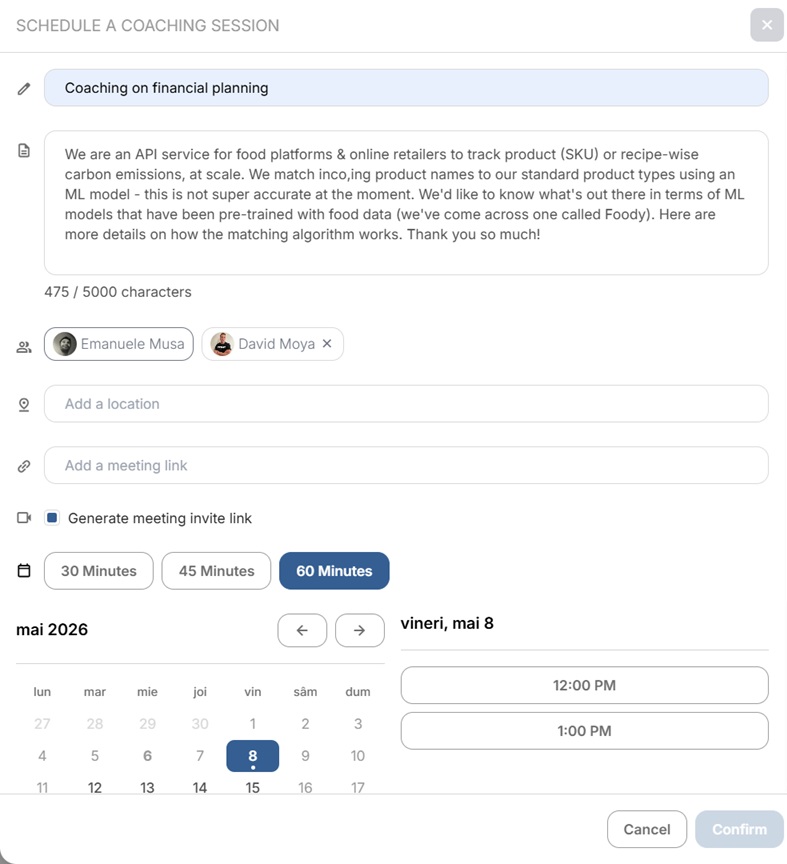
1. Open the scheduler #
Select Schedule (on an application’s details panel, or from a venture or member profile) to open the Schedule a Meet window.
2. Add the details #
Give the meeting a title and description, and add participants using Search for users or Search directory.
3. Add a location or link #
Add a physical location and/or a meeting link — or simply tick Generate meeting invite link to create a video link automatically.
4. Pick a time #
On the week calendar, click a one-hour slot, or click and drag to set any duration — or enter the date and time manually. Only times when the other person is free are offered, based on their synced calendar.
5. Confirm #
Select Confirm. The session lands on everyone’s calendar with the meeting link attached.
Related: Syncing your calendar · Requesting mentoring or expert support.


